---
title: "How to Migrate from Ingress NGINX to Gateway API: The Playbook"
description: Step-by-step production migration guide from ingress-nginx to Kubernetes Gateway API using ingress2gateway. Learn to run an annotation audit and test zero-downtime cutovers.
image: https://www.apefactory.com/hubfs/gatewayapi-migration-1.png
---
[](https://www.apefactory.com/en/)
- [About](https://www.apefactory.com/en/about-us)
- Services
What we do
Crafting cloud native solutions together: our approach ensures maximum value and efficiency for your business.
- [Cloud Services](https://www.apefactory.com/en/cloud-services)
- [Software Factory](https://www.apefactory.com/en/software-factory)
- [Insights](https://www.apefactory.com/en/insights)
- [Careers Hiring](https://www.apefactory.com/en/careers)
[Get in Touch](https://www.apefactory.com/en/contact-us)

# The Blueprint: Migrating from Ingress NGINX Using ingress2gateway
[Insight](https://www.apefactory.com/en/insights/tag/insight) [Kubernetes](https://www.apefactory.com/en/insights/tag/kubernetes) [Gateway API](https://www.apefactory.com/en/insights/tag/gateway-api)
July 08, 2026
There is a massive difference between reading a cloud-native architecture specification on a shiny marketing page and actually executing a migration inside a live production cluster at 2:00 AM.
As we established in our first two posts, the community’s retirement of `ingress-nginx` means your platform engineering team has a mandatory project on the horizon. The old monolithic, annotation-packed model is deprecated, and the Kubernetes Gateway API is the target state.
But knowing *where* you need to go doesn't solve the immediate operational headache: How do you actually translate hundreds of existing Ingress files and thousands of lines of fragile vendor annotations without breaking your current live production edge traffic?
You don't do it manually by copy-pasting YAML fields and guessing the syntax, and you certainly don't change parameters blindly in production. At ape factory, we value deterministic, predictable automation and zero-downtime cutovers. Today, we are going to walk through the exact engineering playbook to migrate your cluster infrastructure cleanly, leveraging parallel environments and the official Kubernetes SIG-Network tool: **`ingress2gateway`**.
Phase 1: Understand Your Public Traffic Topography
Before touching a single installation script, you must trace exactly how your external HTTP/HTTPS web traffic flows into your cluster from left to right.
When you originally deployed `ingress-nginx`, you created a Kubernetes `Service` of type `LoadBalancer`. Your cloud provider (AWS, GCP, Azure) intercepted that resource and provisioned a physical, external load balancer appliance with a public IP address or a CNAME record, which your external DNS provider points to.
When you deploy your new Gateway API controller, the exact same thing will happen: the controller will trigger the provisioning of a *second*, completely independent service of type `LoadBalancer`. This creates a parallel entry point with a brand-new public IP or CNAME.
**This is your ultimate safety net.** It means you can build, configure, and thoroughly test your entire Gateway API routing layer in the dark, side-by-side with your live production environment, without touching a single active user request.
## Phase 2: The Ingress Class Sanitation Check
Before deploying a new controller, you must ensure that your legacy resources are fully isolated. Many modern Gateway API controllers have backward-compatibility features that allow them to automatically parse old `Ingress` resources. If you deploy a new controller into a messy cluster, it might try to hijack your existing production Ingress objects.
To prevent this, you need to run an audit to ensure that every single legacy Ingress explicitly declares its `ingressClassName`. Run this command:
`kubectl get ingress -A -o custom-columns="NAMESPACE:.metadata.namespace,NAME:.metadata.name,CLASS:.spec.ingressClassName"`
Look closely at the output. If any Ingress has a blank `CLASS` column, update its source YAML immediately to explicitly target your old controller:
`spec: ``ingressClassName: nginx`
Explicitly declaring `ingressClassName:nginx` ensures your legacy rules stay bound strictly to the old NGINX controller and won't be interfered with when the new infrastructure comes online.
## Phase 3: The Automated Translation Handshake
The Kubernetes SIG-Network subproject maintains **`ingress2gateway`**, a dedicated CLI tool purpose-built to consume old `Ingress` definitions, parse vendor-specific configuration structures, and output syntactically correct, role-oriented Gateway API resources (`Gateway` and `HTTPRoute`).
You can drop the compiled binary straight into your path:
`go install github.com/kubernetes-sigs/ingress2gateway@v1.0.0`
Let's look at a concrete example. Imagine your development team is running a legacy customer service backend. The file is a classic piece of "Annotation Hell"—it uses complex NGINX rewrite targets to shift URL parameters around:
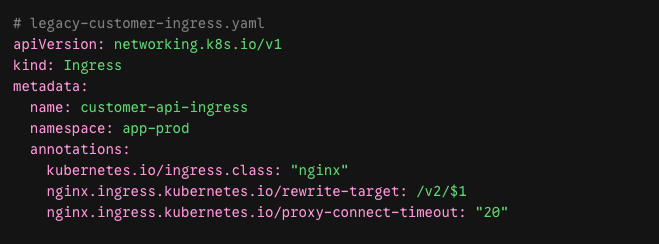
To translate this asset automatically, run the tool using the dedicated provider engine parser:
`ingress2gateway print --providers=ingress-nginx --input-file=legacy-customer-ingress.yaml`
The tool acts as a pure compiler. It reads the source manifest, constructs an intermediate representation of your network rules, and outputs clean, decoupled Gateway API YAML straight to stdout:
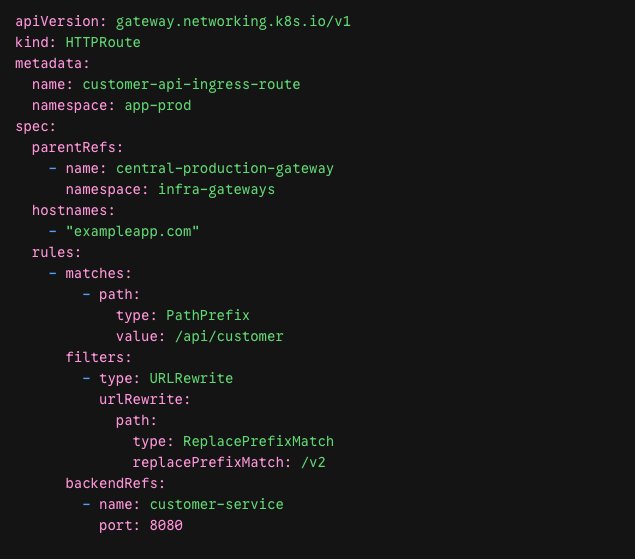
Notice the massive structural upgrade here: the fragile string `nginx.ingress.kubernetes.io/rewrite-target` has been completely eliminated. It is replaced by a first-class, protocol-aware **`URLRewrite` filter** block that the Kubernetes API server can natively parse and validate.
If your inventory contains highly customized extensions, you have a clear path forward depending on your chosen data plane provider:
- **If you use custom header manipulations or basic auth:** Map them directly into Gateway API's native L7 filter spec or use the controller's extension reference patterns (like Traefik's `Middleware` custom resources or Envoy Gateway's `BackendTrafficPolicy`).
- **If you are running complex Lua blocks:** Look into implementations like **NGINX Gateway Fabric**, which provides a native `SnippetsFilter` to give you a soft landing for complex NGINX internal configuration blocks without breaking the new standard.
## Phase 4: Parallel Validation & The Safe Cutover
Once your translated manifests are verified, you do not delete the old Ingress controller. You run both layers in parallel and use your terminal to cross-examine behavioral parity.
### Execute the "Before" Test (Targeting Ingress NGINX)
Port-forward directly to your legacy controller's web port:
`kubectl port-forward deployment/ingress-nginx-controller 8080:80 -n ingress-nginx`
In a separate terminal, execute an explicit curl command to verify your routing logic, headers, and response payloads:
`curl -v -H "Host: exampleapp.com" http://localhost:8080/api/customer/status`
Take note of the exact HTTP headers, response codes, and backend payloads returned.
### Execute the "After" Test (Targeting Gateway API)
Now, terminate that forward and open a pipeline straight into your new Gateway API routing engine:
`kubectl port-forward service/traffic 8080:80 -n traffic`
Run the exact same curl execution payload:
`curl -v -H "Host: exampleapp.com" http://localhost:8080/api/customer/status`
If the status codes, response headers (such as `301 Moved Permanently` for redirects), and application data match exactly, your new routing layer is validated.
### Shift the DNS Pointer
Once your test validations clear across all microservices, you can confidently update your corporate DNS server records. Change your A records or CNAME entries to point away from the legacy Ingress load balancer IP to the new Gateway API infrastructure entry point.
Monitor your access logs across both controllers. As global DNS propagation takes effect, traffic will smoothly drain out of `ingress-nginx` and stream into your clean, role-oriented Gateway layer. Once the old logs hit zero, execute a clean `kubectl delete` to purge your legacy controllers and wipe away years of accumulated annotation debt.
## Selecting Your Concrete Production Engine
You now possess the exact mechanical playbook to extract, translate, and validate your routing infrastructure. But before you apply these manifests to a production system, you need to make a firm decision on which physical controller implementation will power the data plane under the hood.
In our next post, we are going to drop the marketing jargon and run a definitive, head-to-head architectural comparison of the top engines on the market: **Envoy Gateway vs. Traefik vs. NGINX Fabric vs. Istio vs. Linkerd vs. Cilium vs. kgateway**.
*------*
*Beyond Annotation Hell: The Series Roadmap*
*This article is part of our comprehensive guide to mastering the modern Kubernetes traffic plane. Check out the rest of the series to fully stabilize your infrastructure:*
1. *Part 1: [The Post-Ingress Era: Why the Kubernetes Gateway API is Taking Over](https://www.apefactory.com/en/insights/kubernetes-gateway-api-vs-ingress)*
2. *Part 2: [Secure by Default: Setting Up Gateway API + Free SSL (Cert-Manager)](https://www.apefactory.com/en/insights/kubernetes-gateway-api-tls-cert-manager)*
3. *Part 3: The Blueprint: Migrating from Ingress NGINX Using ingress2gateway*
4. *Part 4: [The Ultimate Gateway API Provider Comparison: Cutting Through the Marketing Fluff](https://www.apefactory.com/en/insights/kubernetes-gateway-api-provider-comparison)*
5. *Part 5: [The Next Frontier: Elevating Gateway API to Handle LLMs, MCP, and AI Agents](https://www.apefactory.com/en/insights/kubernetes-gateway-api-ai-mcp-agentgateway)*
## Continue reading
[See all our news & insights](https://www.apefactory.com/en/insights)
#### [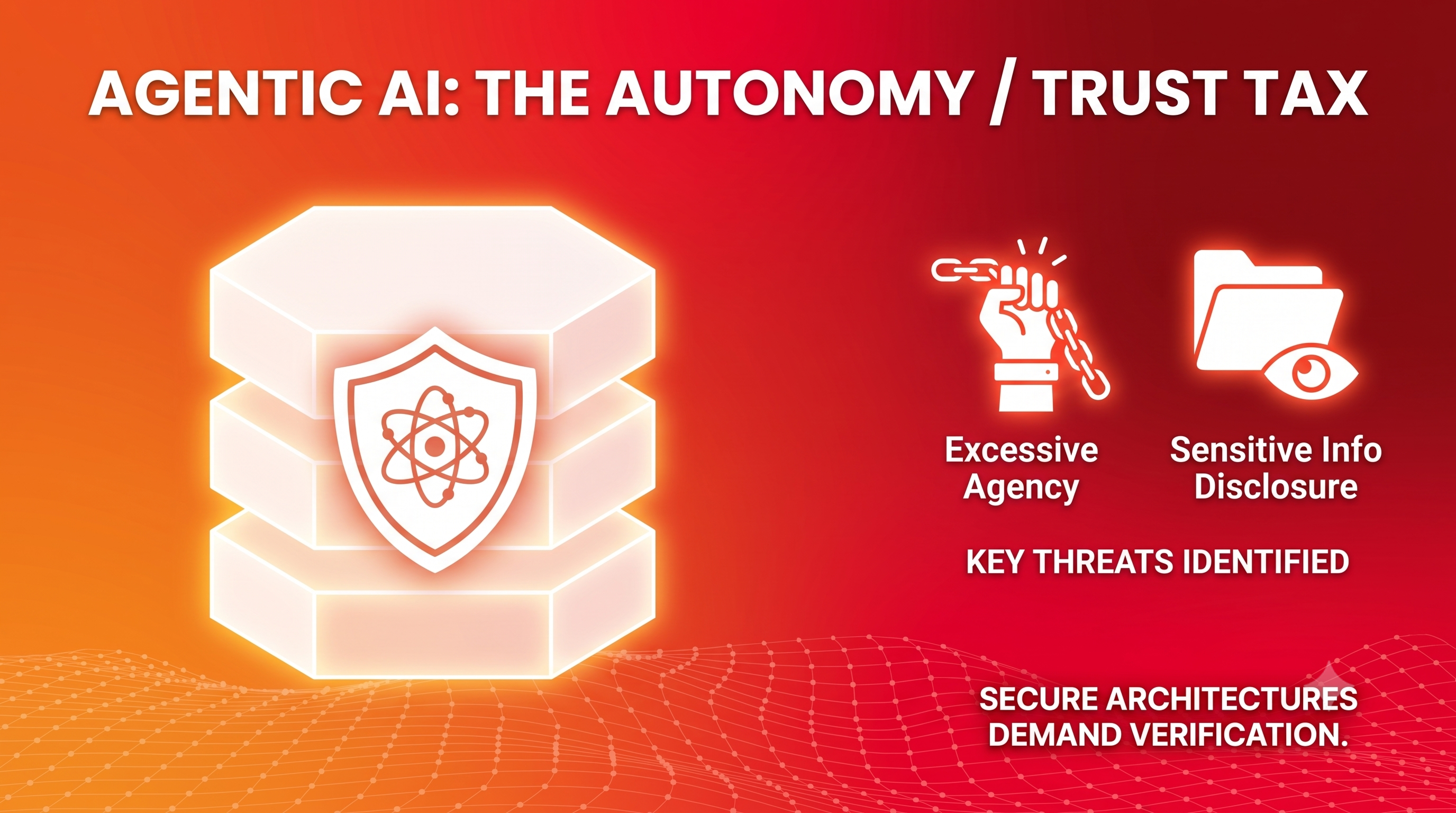 The Agentic Security Myth: How Your AI Stack Is Recreating 1990s Web Exploits Insight Security Open Source Data & AI 21 July, 2026](https://www.apefactory.com/en/insights/the-agentic-security-myth-exploits-owasp-and-open-source-defense)
#### [ Linkerd’s Gateway API Paradox: Mesh Control Without an Ingress Gateway Insight Platform Engineering Kubernetes Gateway API 20 July, 2026](https://www.apefactory.com/en/insights/linkerd-gateway-api-mesh-reality)

## Never miss an update.
Subscribe for spam-free updates and articles.
### Let's explore new possibilities together
Whether you need strategic guidance, bespoke cloud solutions, automated cloud operations, or a robust cloud-native data platform, we’re here to support you throughout every stage of your journey.
[Get in Touch](https://www.apefactory.com/en/contact-us)
###### cloud services
- [Cloud Assessment](https://www.apefactory.com/en/cloud-services/cloud-assessment)
- [Cloud Modernization](https://www.apefactory.com/en/cloud-services/cloud-modernization)
- [Cloud Cost Optimization](https://www.apefactory.com/en/cloud-services/cloud-cost-optimization)
- [Cloud Security](https://www.apefactory.com/en/cloud-services/cloud-security)
###### software factory
- [Platform Engineering](https://www.apefactory.com/en/software-factory/platform-engineering)
- [Cloud Native Engineering](https://www.apefactory.com/en/software-factory/cloud-native-software-engineering)
###### About
- [About Us](https://www.apefactory.com/en/about-us)
- [Insights](https://www.apefactory.com/en/insights)
- [Careers](https://www.apefactory.com/en/careers)
Hiring
###### Technologies
- [Kubernetes](https://www.apefactory.com/en/technologies/kubernetes)
[](https://www.apefactory.com/en/)
© ape factory 2015 - 2026.
- [Imprint](https://www.apefactory.com/en/imprint)
- [Privacy Policy](https://www.apefactory.com/en/privacy-policy)
```json
{
"@context" : "https://schema.org",
"@type" : "BlogPosting",
"author" : {
"@type" : "Person",
"name" : "Team",
"url" : "https://www.apefactory.com/en/insights/author/team"
},
"dateModified" : "2026-07-09T11:08:31.264Z",
"datePublished" : "2026-07-08T15:46:41.000Z",
"headline" : "How to Migrate from Ingress NGINX to Gateway API: The Playbook",
"image" : [ "https://www.apefactory.com/hubfs/gatewayapi-migration-1.png" ],
"mainEntityOfPage" : {
"@id" : "https://www.apefactory.com/en/insights/migrate-ingress-nginx-to-gateway-api",
"@type" : "WebPage"
},
"publisher" : {
"@type" : "Organization",
"logo" : {
"@type" : "ImageObject",
"url" : "https://www.apefactory.com/hubfs/Website%202026/APE-logo-white.svg"
}
}
}
```