Understanding KubeVirt Internals: Controllers, QEMU/KVM and VM Lifecycle
Follow a KubeVirt VM from its API definition through VMI reconciliation, virt-launcher and QEMU/KVM, using reproducible YAML and lifecycle commands.
On this page
A Kubernetes pod can be scheduled without its application being ready. KubeVirt adds another boundary: a VirtualMachine (VM) can exist without any guest running, and a VirtualMachineInstance (VMI) can exist before QEMU has successfully booted the guest. Understanding those distinctions is the fastest way to troubleshoot a VM that appears to be running but is not usable.
This article traces one VM through its lifecycle. Instead of a separate lab download, the YAML and commands are embedded below. The objective is narrow: observe what persists, what gets created, and where Kubernetes stops and virtualization begins.
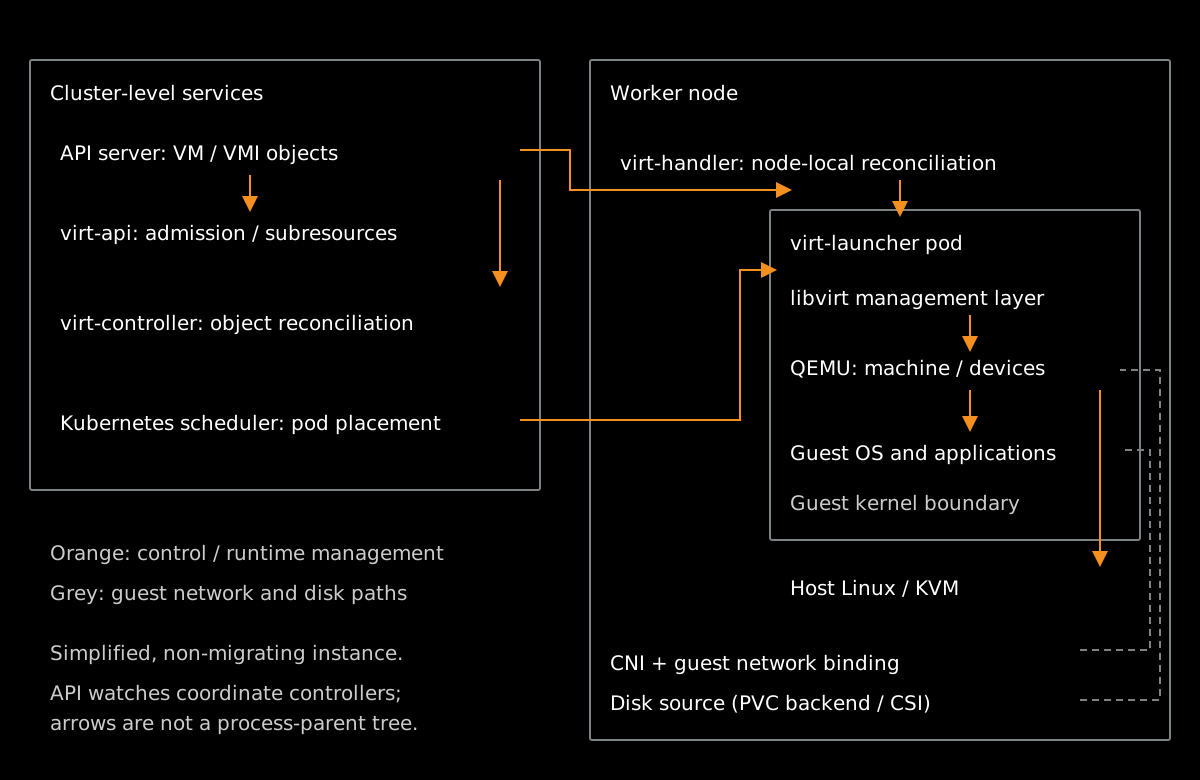
The execution chain
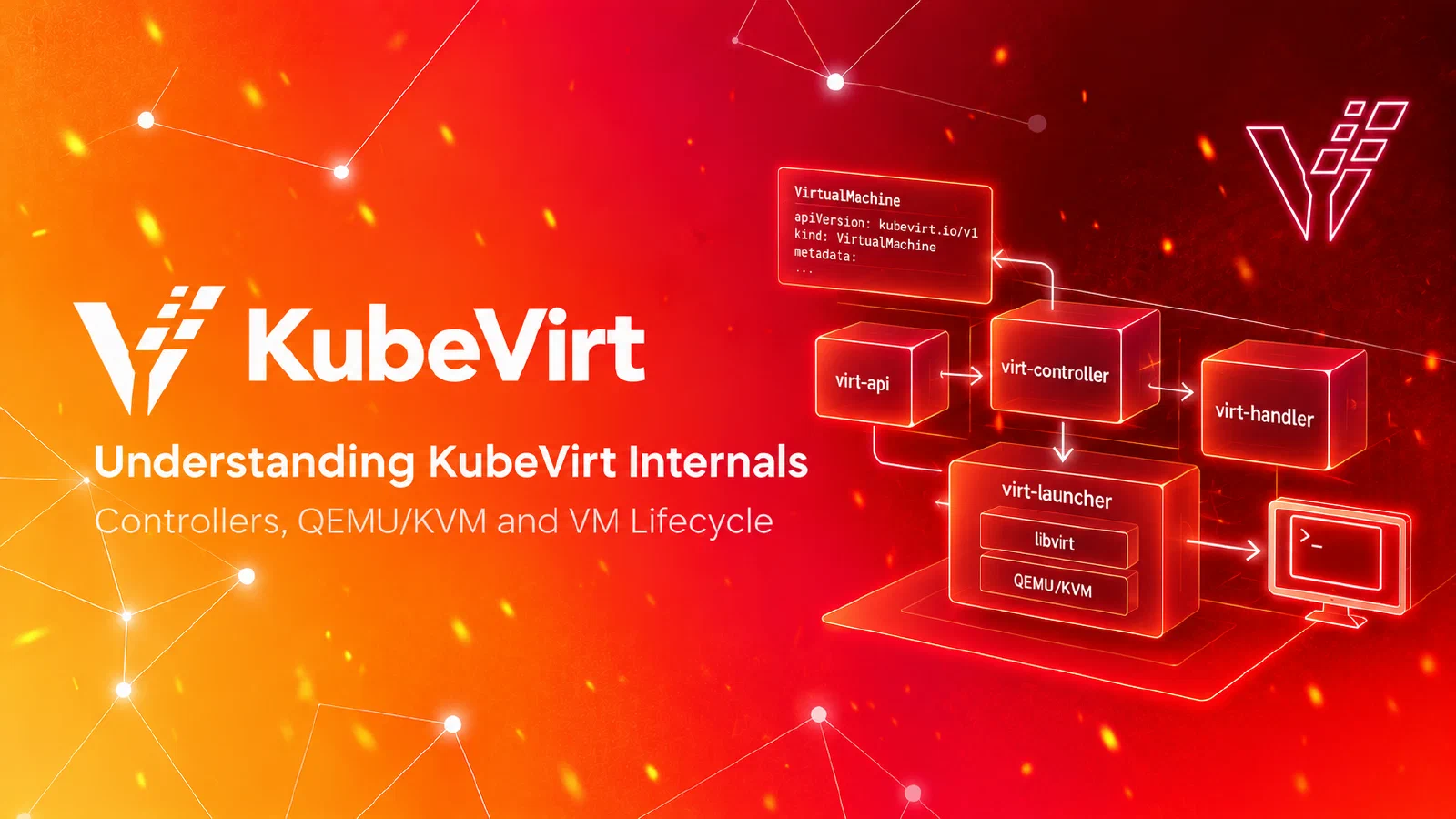
A VM is a durable Kubernetes management object containing an instance template and lifecycle policy. A VMI represents one execution of that template. A virt-launcher pod is the Kubernetes scheduling and resource envelope for the virtualization runtime. Inside it, KubeVirt uses libvirt to manage QEMU, which models the virtual hardware; the Linux KVM interface accelerates guest CPU execution.
The responsibilities are distributed:
- The Kubernetes API server accepts the VM custom resource, subject to validation and admission webhooks served by
virt-api. - VM reconciliation in
virt-controllercreates or manages the VMI according to the requested lifecycle state. - VMI reconciliation in
virt-controllercreates the launcher pod. - The Kubernetes scheduler places the pod, and kubelet prepares it on the selected node.
- Node-local
virt-handlercoordinates VMI runtime state withvirt-launcher, which manages the libvirt/QEMU domain. - Runtime observations update VMI status, which informs the managed VM’s status.
This is asynchronous reconciliation, not a synchronous call from the API server to QEMU. virt-operator manages KubeVirt’s own installation and components; it does not directly operate each guest.
The walkthrough uses an ephemeral container disk and pod-network masquerade binding. It does not demonstrate persistent volumes, secondary networks, live migration or high availability.
Before you start
Use a disposable, non-production cluster with KubeVirt installed, a matching virtctl client and a worker with usable KVM. Linux x86_64 with /dev/kvm is the straightforward option. A kind-based KubeVirt environment
can work on a compatible Linux host, but Docker Desktop on macOS is not a substitute for working KVM passthrough. The commands below assume your current Kubernetes context already points to the intended lab cluster; check it first:
kubectl config current-context
kubectl get nodes -o wide
kubectl get kubevirt -A
The manifest uses a KubeVirt v1.6.0 source-inspection baseline and a digest-pinned CirrOS container disk taken from the existing lab assets. The digest is not proof that the guest boots in your cluster. Check the installed KubeVirt version and registry access before execution. The examples have not been runtime-tested in this environment.
Create a VM without starting it
We deliberately use runStrategy: Manual: applying the resource creates the management object but does not request a running instance. Copy this complete block into a terminal:
kubectl create namespace kubevirt-lab

cat <<'YAML' | kubectl -n kubevirt-lab apply -f -
apiVersion: kubevirt.io/v1
kind: VirtualMachine
metadata:
  name: internals-demo
  namespace: kubevirt-lab
spec:
  runStrategy: Manual
  template:
    spec:
      domain:
        cpu:
          cores: 1
        resources:
          requests:
            memory: 256Mi
        devices:
          disks:
            - name: rootdisk
              disk:
                bus: virtio
          interfaces:
            - name: default
              masquerade: {}
      networks:
        - name: default
          pod: {}
      volumes:
        - name: rootdisk
          containerDisk:
            image: quay.io/kubevirt/cirros-container-disk-demo@sha256:b3173a795eddc0c8f6923bb197928b7c0876aade4daf85d0558dfae65f403fe2
YAML

kubectl -n kubevirt-lab get vm,vmi
Expected observation: the VM exists, but there is no VMI. A missing VMI here is not a failure: no start operation has been requested. The VM’s persistent UID is already assigned:
kubectl -n kubevirt-lab get vm internals-demo \
  -o jsonpath='{.metadata.uid}{"\n"}'
This separates management identity from execution identity. The VM can outlive many successive VMIs.
Start the VM and follow the objects
Start the machine and observe the resources being created:
virtctl -n kubevirt-lab start internals-demo
kubectl -n kubevirt-lab get vm,vmi,pods -o wide
The VMI and launcher pod may appear at different moments. Wait for the VMI to reach Running, if the guest starts successfully:
kubectl -n kubevirt-lab wait \
  --for=jsonpath='{.status.phase}'=Running \
  vmi/internals-demo --timeout=180s
Now inspect the owner relationships and the assigned node:
kubectl -n kubevirt-lab get vmi internals-demo \
  -o jsonpath='VMI UID: {.metadata.uid}{"\n"}Owners: {.metadata.ownerReferences}{"\n"}Node: {.status.nodeName}{"\n"}'

kubectl -n kubevirt-lab get pods \
  -l kubevirt.io=virt-launcher -o wide

kubectl -n kubevirt-lab get events \
  --sort-by=.metadata.creationTimestamp
Expected observation: The VM owns the VMI, and the VMI directly owns the launcher pod. Inspecting the pod’s ownerReferences shows that it points to kind: VirtualMachineInstance with the VMI’s UID—not the parent VM’s UID. This reinforces the boundary: the VM manages desired state, but the ephemeral runtime pod belongs strictly to the execution object (the VMI).
To inspect the launcher pod without guessing its generated name:
kubectl -n kubevirt-lab get pods \
  -l kubevirt.io=virt-launcher \
  -o custom-columns='NAME:.metadata.name,OWNER:.metadata.ownerReferences[0].uid,NODE:.spec.nodeName'
In a shared namespace the selector may return other launcher pods. Match the OWNER_UID to the VMI UID (and verify OWNER_KIND is VirtualMachineInstance) before continuing.
Where does QEMU/KVM fit?
The launcher pod is not itself the guest OS. It provides a controlled userspace environment for the VM runtime. KubeVirt manages the libvirt domain; QEMU supplies virtual CPUs, disks, network devices and other emulated or paravirtualized hardware. With KVM available, QEMU asks the host Linux kernel to execute guest CPU instructions using hardware virtualization.
Inspect the selected launcher pod:
# Replace this value with the pod identified in the previous step.
LAUNCHER_POD=<your-virt-launcher-pod>

kubectl -n kubevirt-lab describe pod "$LAUNCHER_POD"
kubectl -n kubevirt-lab get pod "$LAUNCHER_POD" \
  -o jsonpath='{.spec.nodeName}{"\n"}{.spec.containers[*].name}{"\n"}'
Where the compute container includes suitable tooling and your RBAC permits execution, you can attempt:
kubectl -n kubevirt-lab exec "$LAUNCHER_POD" -c compute -- ps -efThis last command is optional: ps might not be installed, and process visibility varies with runtime configuration. A failed ps command does not mean QEMU is absent. For a direct guest-facing check, try:
virtctl -n kubevirt-lab console internals-demoExit the console with Ctrl+]. The console may require guest-side configuration and is not an application readiness check.
The important distinction is that Kubernetes schedules the launcher pod; KubeVirt coordinates the guest runtime; QEMU/KVM executes the virtual machine. These are separate operational boundaries, with different logs, conditions and permissions.
Stop and start: which identities survive?
This is the most useful lifecycle experiment. Record the VM and VMI UIDs:
kubectl -n kubevirt-lab get vm internals-demo \
  -o jsonpath='VM: {.metadata.uid}{"\n"}'

kubectl -n kubevirt-lab get vmi internals-demo \
  -o jsonpath='VMI: {.metadata.uid}{"\n"}'
Also record the UID of the launcher pod associated with that VMI:
kubectl -n kubevirt-lab get pod "$LAUNCHER_POD" \
  -o jsonpath='Launcher: {.metadata.uid}{"\n"}'
Stop the VM and wait for the VMI to disappear:
virtctl -n kubevirt-lab stop internals-demo
kubectl -n kubevirt-lab wait \
  --for=delete vmi/internals-demo --timeout=180s
kubectl -n kubevirt-lab get vm,vmi
The VM object should remain. Start it again:
virtctl -n kubevirt-lab start internals-demo
kubectl -n kubevirt-lab wait \
  --for=jsonpath='{.status.phase}'=Running \
  vmi/internals-demo --timeout=180s

kubectl -n kubevirt-lab get vm internals-demo \
  -o jsonpath='VM: {.metadata.uid}{"\n"}'
kubectl -n kubevirt-lab get vmi internals-demo \
  -o jsonpath='VMI: {.metadata.uid}{"\n"}'
kubectl -n kubevirt-lab get pods -l kubevirt.io=virt-launcher \
  -o custom-columns='NAME:.metadata.name,UID:.metadata.uid,OWNER:.metadata.ownerReferences[0].uid'
Compare the before-and-after values:
| Resource | Expected after stop/start | Why |
|---|---|---|
| VM | Same UID | The persistent management object was retained |
| VMI | New UID | A new execution was created |
| Launcher pod | New UID | A new runtime pod was created for that execution |
This is different from a guest OS reboot, which normally preserves the VMI and launcher identities. It is also different from live migration, which retains the VMI identity while changing the runtime placement and launcher pod. Neither is exercised here.
The container disk is ephemeral: do not infer that writes inside the guest survive instance replacement. Durable VM storage requires a separately designed PVC-backed disk lifecycle.
Diagnosing a VM that does not start
Work from the outer boundary inward. A missing VMI calls for different investigation than a booting guest with a broken application.
| Observation | Inspect first | Likely boundary |
|---|---|---|
| VM create rejected | API error, RBAC, admission message | API / virt-api |
| VM exists, no VMI after start | VM conditions, run strategy, events | VM reconciliation |
| Launcher pod Pending | Pod events, node capacity, KVM resource | Kubernetes scheduling |
| Launcher pod scheduled, VMI not running | Pod/container status, handler and launcher logs | Runtime preparation |
| VMI Running, guest fails to boot | Console, image, virtual disks | Guest boot |
| Guest boots, service unreachable | Guest networking, application listener, policy | Guest / CNI / application |
Useful first commands:
kubectl -n kubevirt-lab describe vm internals-demo
kubectl -n kubevirt-lab describe vmi internals-demo
kubectl -n kubevirt-lab get events --sort-by=.metadata.creationTimestamp
Do not confuse a successful lifecycle API response, a scheduled launcher pod, a Running VMI and a healthy guest application. They answer different questions.
Cleanup
Stop and remove only the VM created for this walkthrough:
virtctl -n kubevirt-lab stop internals-demo
kubectl -n kubevirt-lab wait \
  --for=delete vmi/internals-demo --timeout=180s
kubectl -n kubevirt-lab delete vm internals-demo
kubectl -n kubevirt-lab get all
If the namespace was created solely for this walkthrough and contains nothing else you need, delete it explicitly with kubectl delete namespace kubevirt-lab. Do not delete a shared namespace or force-remove runtime objects.
What this tells us about KubeVirt
The distinction between desired state, execution identity and guest runtime is the operational model that matters. A VM is the stable definition; a VMI represents one execution; a launcher pod is Kubernetes’ scheduling boundary; and QEMU/KVM is the virtualization boundary. When something fails, inspect the first boundary that has not progressed instead of starting with the guest console.
The same reasoning scales beyond this minimal example. Persistent storage, secondary networks, migration and recovery introduce more components and failure modes, but they do not erase these ownership boundaries.