Kubernetes Autoscaling: Why HPA and VPA can work against each other
Understand why Kubernetes HPA and VPA can conflict, how resource requests influence scaling decisions, and how to design stable production autoscaling strategies.
On this page
Kubernetes has two pod autoscalers. One decides how many pods you need. The other decides how large those pods should be.
Sounds like a sensible division of responsibilities. Until you realise that one controller can change the very metric the other controller uses to make its decisions.
Imagine an application processing a constant volume of requests. Traffic has not increased. CPU consumption has not changed. Yet Kubernetes decides to reduce the number of replicas because another controller increased their CPU requests. Neither controller is malfunctioning. Both are doing exactly what they were designed to do. The problem is architectural: independent control loops operating on a shared system.
In our previous article, How to Implement Vertical Pod Autoscaling (VPA) in Kubernetes , we explored how VPA works and how to configure it. Here, we examine what happens when horizontal scaling, vertical scaling and infrastructure capacity management interact in a production Kubernetes cluster.
Two Controllers, One Workload
The Horizontal Pod Autoscaler (HPA) and Vertical Pod Autoscaler (VPA) address different dimensions of application capacity.
| Controller | Observes | Controls |
|---|---|---|
| HPA | Resource, custom or external metrics | Number of replicas |
| VPA | Container resource consumption and historical observations | Container resource sizing |
| Node autoscaler | Scheduling requirements and node utilisation constraints | Infrastructure capacity |
HPA changes the number of application instances. VPA recommends or adjusts the resources allocated to individual instances.
Both operate asynchronously. Neither has a complete understanding of the application’s performance characteristics, service-level objectives or the decisions made by the other controller. Kubernetes does not automatically coordinate these controllers into a single application-level optimisation strategy.
That responsibility belongs to the platform engineer.
Understanding the HPA Control Loop
When configured to scale on CPU utilisation, HPA does not simply observe how much CPU an application consumes. It observes CPU consumption relative to the configured CPU requests.
The simplified scaling algorithm is:
Where:
R_currentis the current number of replicas.M_currentis the observed metric value.M_targetis the configured target metric value.R_desiredis the calculated desired number of replicas.
Consider an application running four replicas. Each replica consumes approximately 400 millicores of CPU and has a CPU request of 500 millicores.
The observed CPU utilisation is therefore 80%. With an HPA target of 70%, the simplified calculation produces:
HPA calculates a desired replica count of five. The actual controller also considers tolerance thresholds, missing metrics, pod readiness, scaling policies and stabilisation windows. Nevertheless, the simplified equation exposes the fundamental dependency.
CPU requests are part of the scaling signal.
When VPA Changes the HPA Scaling Signal
Now introduce VPA. Suppose VPA determines that the CPU request should increase from 500 millicores to 1,000 millicores. Assume the recommendation has been applied to all four pods and that application demand and CPU consumption remain unchanged.
| Parameter | Before resizing | After resizing |
|---|---|---|
| Current replicas | 4 | 4 |
| CPU consumption per pod | 400m | 400m |
| CPU request per pod | 500m | 1000m |
| Observed CPU utilisation | 80% | 40% |
| HPA utilisation target | 70% | 70% |
| Calculated desired replicas | 5 | 3 |
The new HPA calculation becomes:
The calculated scaling direction has reversed. Not because traffic decreased. Not because the application became more efficient. But because the denominator of the utilisation metric changed.
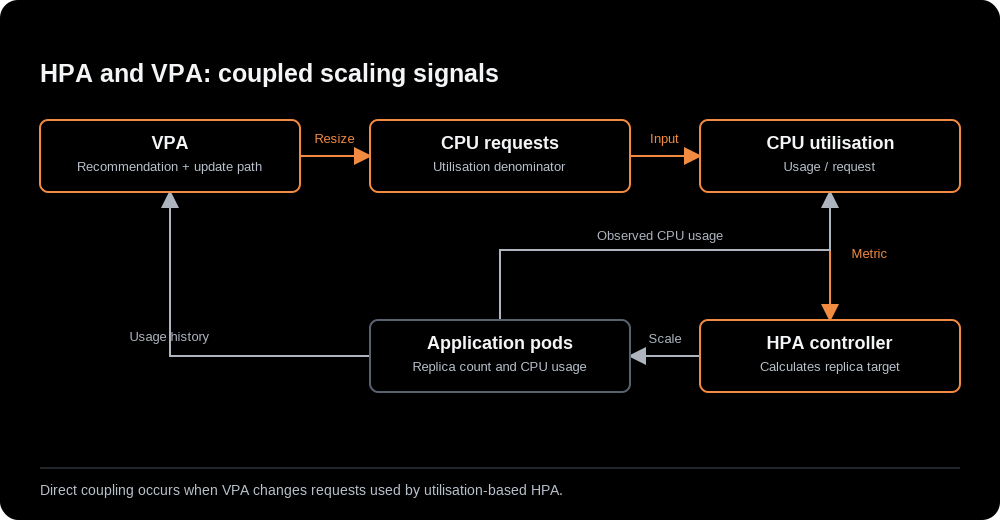
Explore the interaction
Use the following simulator to change the CPU request while keeping the current replica count and CPU consumption constant.
HPA / VPA interaction simulator
Change CPU requests without changing observed CPU consumption.
ceil(4 × 80.0 / 70) = 5
- Calculated direction
- Scale up
- Current CPU requests
- 2.00 cores
- Projected CPU requests
- 2.50 cores
The simulator isolates a single HPA calculation. It does not simulate workload redistribution, VPA recommendation generation, controller timing or Kubernetes scaling safeguards.
In a real cluster, reducing the number of replicas may increase CPU consumption per remaining replica. That can influence subsequent HPA decisions and future VPA recommendations. Depending on the workload and controller configuration, this interaction can produce unnecessary scaling activity, unstable resource allocation or a different equilibrium than intended.
Oscillation is possible, but it is not inevitable. The architectural issue is the coupling between two independently operating controllers.
Designing Independent Scaling Strategies
The objective is not to choose between HPA and VPA. It is to prevent them from competing over the same scaling signal.
There are three practical approaches.
Use VPA as an Observational Controller
Configure HPA to manage replica counts and run VPA in recommendation-only mode:
updateMode: "Off"
VPA collects resource consumption observations and generates recommendations without modifying running or newly created pods. Platform engineers can review these recommendations and incorporate appropriate changes into their deployment configuration.
This is a useful starting point for existing production workloads because it introduces resource-sizing intelligence without immediately introducing another active actuator. However, manually applying CPU recommendations still changes the HPA utilisation denominator. Resource changes should therefore be evaluated together with the HPA configuration.
Separate CPU and Memory Responsibilities
For CPU-driven workloads, configure HPA to scale on CPU utilisation while restricting VPA to memory recommendations or adjustments. This removes the direct dependency between VPA-controlled CPU requests and HPA’s CPU utilisation calculation. It does not eliminate every interaction.
Changes to memory allocation can affect garbage collection, application caching, scheduling behaviour and CPU consumption. Resource separation reduces controller coupling. It does not guarantee application stability.
Scale Horizontally on Application Demand
A more application-oriented approach is to configure HPA using custom or external metrics:
- HTTP requests per second.
- Message queue backlog.
- Kafka consumer lag.
- Concurrent requests.
- Outstanding application work.
VPA can then manage CPU and memory sizing independently of the resource-request denominator used by utilisation-based HPA configurations.
This requires an appropriate metrics pipeline, such as a custom metrics adapter or an event-driven autoscaling solution like KEDA . KEDA typically manages an underlying HPA. It changes how horizontal scaling signals are obtained; it does not remove the horizontal scaling control loop.
The chosen metric must also reflect how application capacity responds to additional replicas. A poorly selected custom metric can produce unstable scaling regardless of VPA.
Choosing an Autoscaling Strategy
There is no universally optimal HPA and VPA configuration.
| HPA scaling signal | VPA configuration | Assessment |
|---|---|---|
| CPU utilisation | Automatic CPU and memory resizing | Avoid direct coupling |
| CPU utilisation | CPU and memory recommendations only | Conservative starting point |
| CPU utilisation | Memory-only resizing | Viable with validation |
| Memory utilisation | CPU-only resizing | Viable with validation |
| Application request rate | CPU and memory resizing | Viable with validation |
| Queue backlog | CPU and memory resizing | Viable with validation |
| Absolute CPU consumption | CPU and memory resizing | Evaluate workload behaviour |
Absolute CPU metrics remove the direct dependency on CPU requests, but resource changes can still influence actual CPU consumption and application throughput. The correct strategy depends on application architecture, workload characteristics, operational constraints and the quality of available metrics.
The Third Control Loop: Infrastructure Capacity
Pod autoscaling does not operate independently of the underlying infrastructure. HPA can create additional replicas. VPA can increase the resource requests of individual pods. Both can increase aggregate scheduling requirements.
Consider the following resource allocation:
| Configuration | Replicas | CPU request per pod | Total requested CPU |
|---|---|---|---|
| Initial workload | 4 | 500m | 2 cores |
| Horizontal scaling only | 8 | 500m | 4 cores |
| Vertical resizing only | 4 | 1000m | 4 cores |
| Combined scaling | 8 | 1000m | 8 cores |
The combined configuration requests four times the original CPU capacity. If the existing nodes cannot accommodate the resulting pods, additional infrastructure capacity may be required.
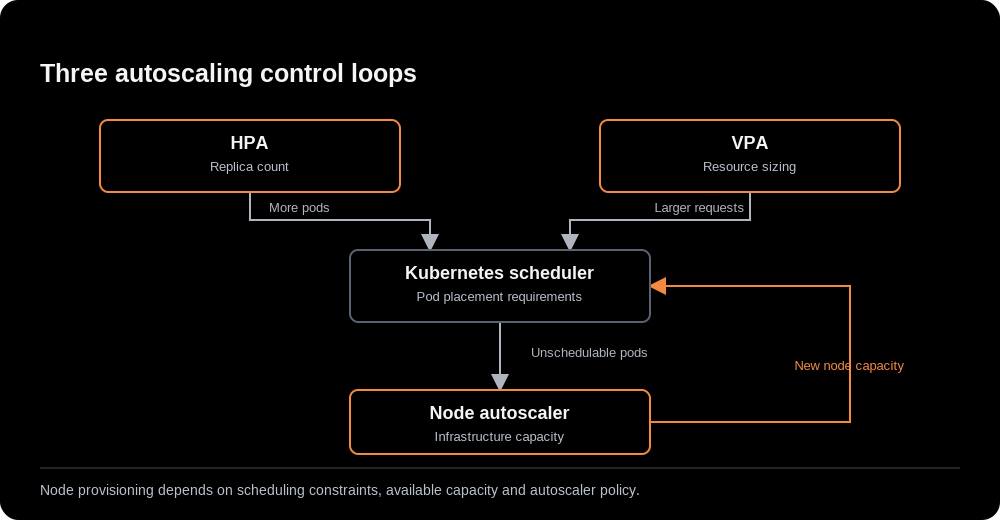
A node autoscaler, such as Cluster Autoscaler or Karpenter, may respond by provisioning additional nodes when pods cannot be scheduled. This introduces another set of operational constraints:
- Infrastructure provisioning latency.
- Available instance types and node pool limits.
- Resource quotas and scheduling constraints.
- Pod placement and resource fragmentation.
- Infrastructure cost.
A VPA recommendation can therefore become an infrastructure provisioning event, even without an increase in application traffic. Conversely, reducing resource requests may improve scheduling efficiency and enable node consolidation.
The cost of a Kubernetes workload is not determined solely by the number of replicas or their resource consumption. It is also influenced by how their requested resources translate into provisioned infrastructure.
A Production-Oriented Configuration
For an existing CPU-driven application, a conservative starting point is to let HPA manage replica counts while VPA provides memory-sizing recommendations. The following example assumes that the api-server Deployment already exists, its containers have appropriate CPU requests, and both autoscaling components and their required metrics pipelines are available.
apiVersion: autoscaling/v2
kind: HorizontalPodAutoscaler
metadata:
  name: api-server
  namespace: production
spec:
  scaleTargetRef:
    apiVersion: apps/v1
    kind: Deployment
    name: api-server
  minReplicas: 3
  maxReplicas: 20
  metrics:
    - type: Resource
      resource:
        name: cpu
        target:
          type: Utilization
          averageUtilization: 70
  behavior:
    scaleDown:
      stabilizationWindowSeconds: 300
---
apiVersion: autoscaling.k8s.io/v1
kind: VerticalPodAutoscaler
metadata:
  name: api-server
  namespace: production
spec:
  targetRef:
    apiVersion: apps/v1
    kind: Deployment
    name: api-server
  updatePolicy:
    updateMode: "Off"
  resourcePolicy:
    containerPolicies:
      - containerName: api
        controlledResources:
          - memory
        controlledValues: RequestsOnly
        minAllowed:
          memory: 256Mi
        maxAllowed:
          memory: 2Gi
      - containerName: "*"
        mode: "Off"
The configuration establishes explicit responsibilities.
HPA controls replica counts based on CPU utilisation. VPA observes the api container and produces memory-sizing recommendations within defined boundaries. Other containers are excluded from VPA management. The memory boundaries are illustrative and must be validated against application behaviour and existing memory limits. Once sufficient observations are available, the platform team can evaluate whether automated resizing is appropriate.
VPA’s Initial mode applies recommendations to newly created pods, potentially resulting in different resource allocations across replicas. Modes such as Recreate and InPlaceOrRecreate introduce different disruption and resizing semantics. Their availability depends on the installed VPA and Kubernetes versions.
A PodDisruptionBudget can constrain supported voluntary evictions, but it does not guarantee application availability or protect against every type of disruption.
GitOps and Controller Ownership
Autoscaling also introduces a configuration ownership problem. In a GitOps-managed Kubernetes environment, multiple controllers may attempt to reconcile different aspects of the same workload.
A practical ownership model is:
| Configuration | Responsible component |
|---|---|
| Desired replica count | HPA |
| Baseline resource requests and limits | GitOps |
| Resource-sizing recommendations | VPA recommender |
| Automated live pod resizing | VPA, when enabled |
| Scaling thresholds and resource boundaries | GitOps |
| Event-driven scaling configuration | KEDA, when used |
| Infrastructure capacity | Node autoscaler |
A GitOps controller should not continuously overwrite the replica count selected by HPA. Similarly, VPA adjustments to live pods should not be mistaken for persistent changes to the Deployment’s pod template. When running VPA in recommendation-only mode, resource changes should normally be reviewed and committed to the declarative source of truth.
The objective is to establish clear field ownership rather than introduce competing reconciliation loops.
Observing the Entire Scaling System
Monitoring each autoscaler independently is insufficient. A production autoscaling strategy should correlate:
- Application throughput, latency and error rates.
- Current and desired replica counts.
- CPU and memory consumption.
- Resource requests and VPA recommendations.
- Pending pods and scheduling failures.
- Pod evictions and restarts.
- Node provisioning and consolidation events.
- Infrastructure capacity and cost.
Start by inspecting the controller states:
kubectl get hpa api-server -n production

kubectl describe vpa api-server -n production

kubectl get pods -n production -o wide

kubectl get events -n production \
  --sort-by='.metadata.creationTimestamp'
For historical analysis, correlate these observations using your monitoring platform. The important question is not whether each autoscaler is functioning correctly in isolation. It is whether the combined system maintains application performance and availability while consuming an appropriate amount of infrastructure capacity.
Conclusion
Kubernetes autoscaling is not simply a choice between horizontal and vertical scaling. It is a distributed control problem.
HPA manages application concurrency. VPA manages resource sizing. Node autoscaling manages infrastructure capacity. Each controller makes decisions based on a partial view of the system. Combining them successfully requires an understanding of their scaling signals, reconciliation boundaries and indirect dependencies.
Start with explicit ownership. Separate scaling signals where possible. Introduce automated resource resizing gradually. Evaluate the behaviour of the complete system rather than individual controllers. More automation does not automatically produce better resource efficiency. Better coordination does.
References
- Kubernetes — Horizontal Pod Autoscaling
- Kubernetes — Vertical Pod Autoscaler
- Kubernetes — Node Autoscaling
- Kubernetes — Pod Disruptions
- KEDA — Kubernetes Event-driven Autoscaling
Designing a Kubernetes platform where application scaling, resource allocation and infrastructure costs remain predictable requires more than enabling autoscaling controllers. At ape factory, we help organisations design, operate and optimise Kubernetes platforms with clear operational boundaries and measurable performance objectives.